In the realm of B2B marketing, the strategic use of email automation campaigns is not just a trend but a cornerstone for success. This blog post delves into the nuances of elevating customer engagement and conversion rates through meticulously crafted email sequences, personalised content, and the smart use of behavioural triggers. We’ll explore how comprehensive analytics tracking can transform your email marketing into a powerhouse of optimised success.
Mastering Email Automation Campaigns for B2B Success
Crafting Targeted Email Sequences for Maximum Engagement
- Strategic Segmentation in Email Automation Campaigns: Start your email automation campaigns by segmenting your customer base using detailed analytics. This segmentation allows you to tailor your messages to specific groups, making each email more relevant and impactful. For instance, segment by industry, job role, or past engagement to create highly targeted content that resonates with each group.
- Creating Personalised Content: Personalization is key in email automation campaigns. Go beyond using the recipient’s name; tailor your content based on their past interactions, preferences, and needs. This could mean different content for new leads versus long-term customers, ensuring each email adds value to their specific journey with your brand.
- Timing Emails for Optimal Engagement: In email automation campaigns, timing is everything. Analyse customer behaviour to determine the best time to send emails. For example, send follow-up emails immediately after a webinar or a product demo, capitalising on their heightened interest.
- Utilising A/B Testing: Continuously refine your email automation campaigns with A/B testing. Test different subject lines, email formats, and call-to-actions to see what works best. This ongoing optimization ensures your emails remain effective and engaging over time.
- Integrating CRM for Cohesive Messaging: Enhance your email automation campaigns by integrating them with your CRM system. This integration allows for a unified approach to customer communication, ensuring that your emails are consistent with other touchpoints and providing a seamless customer experience.
Personalising Content to Boost Open Rates
- Leveraging Data for Tailored Messaging: In your email automation campaigns, use customer data to create messages that speak directly to the recipient’s needs and interests. Analyse their interaction history, purchase patterns, and engagement levels to craft emails that feel personally crafted for each recipient.
- Implementing Dynamic Content: Dynamic content is a powerful tool in email automation campaigns. It allows you to change parts of your email based on the recipient’s profile or behaviour. For example, show different product recommendations or content pieces based on their browsing history or past purchases.
- AI-Driven Customization: Utilise AI technology to scale up your personalization efforts in email automation campaigns. AI can analyse large sets of data to predict and deliver the most relevant content to each recipient, making your emails more effective and engaging.
- Effective List Segmentation: Properly segment your email list to enhance the relevance of your email automation campaigns. Group your contacts based on demographics, behaviour, or engagement level to ensure that each email is sent to the most appropriate audience, increasing the likelihood of engagement and conversion.
Implementing Behavioural Triggers in Email Campaigns
- Identifying Key Behavioural Triggers: Start by pinpointing the actions that indicate a customer’s interest or stage in the buying cycle. This could be website visits, email interactions, or product inquiries. Use these triggers to automate relevant and timely emails, enhancing the customer’s journey and increasing engagement with your brand.
- Setting Up Automated Responses: Once you’ve identified these triggers, set up automated email responses that align with them. For instance, if a customer downloads a whitepaper, trigger an email that suggests related webinars or articles. This approach ensures timely and relevant communication, fostering a deeper connection with your audience.
- Customising Triggers for Different Segments: Tailor your triggers to different customer segments for more effective targeting. A new lead might receive introductory content, while a repeat customer might get loyalty rewards. This level of customization in your email automation campaigns ensures that each message resonates with its intended audience.
- Integrating Web Analytics for Trigger Refinement: Use web analytics to refine your behavioural triggers continually. Analyse which actions lead to conversions and adjust your triggers accordingly. This data-driven approach ensures your email automation campaigns are always optimised for maximum impact.
- Continuous Monitoring and Adjustment of Triggers: Regularly review and adjust your triggers to keep up with changing customer behaviours and preferences. This ongoing optimization ensures your email automation campaigns remain relevant and effective, driving engagement and conversions.
Strategic Approaches to Email Campaign Management
Structuring Efficient Email Campaign Workflows
- Designing a Streamlined Email Workflow: Begin by mapping out your entire email campaign process, from conception to execution. Identify areas where automation can streamline tasks, such as content creation, scheduling, and follow-ups. A well-structured workflow increases efficiency and reduces the likelihood of errors.
- Automating Repetitive Tasks: Use automation tools to handle repetitive tasks within your email campaigns. This includes sending out routine communications, segmenting lists, and updating customer data. Automating these tasks frees up time for more strategic activities, enhancing the overall effectiveness of your campaigns.
- Integrating Email Platforms with Other Tools: Connect your email platform with other marketing tools like CRM systems, analytics software, and content management systems. This integration provides a unified view of your campaigns, allowing for more cohesive and data-driven strategies.
- Regular Review and Refinement of Workflows: Continuously assess and refine your email workflows. Look for bottlenecks or inefficiencies and address them promptly. Regular reviews ensure your processes stay up-to-date with the latest marketing trends and technologies.
Setting and Achieving Email Campaign Objectives
Establishing Clear Campaign Goals
Begin by setting specific, measurable goals for your email campaigns. This could involve increasing open rates, boosting click-through rates, or driving more conversions. It’s crucial to align these goals with your broader marketing strategy to ensure cohesive efforts. For instance, if your overarching aim is to enhance brand awareness, your email campaign should focus on content that resonates with this objective.
Aligning Objectives with Overall Marketing Strategy
Your email campaigns shouldn’t operate in isolation. Integrate them into your overall marketing strategy for a unified approach. This means if your marketing strategy is heavily focused on content marketing, your email campaigns should complement this by distributing and amplifying your content effectively.
Measuring Success Against Objectives
Utilise tools and platforms that offer comprehensive analytics to track the performance of your email campaigns against set objectives. Metrics like open rates, click-through rates, and conversion rates are vital. For example, a high open rate but low conversion rate might indicate compelling subject lines but less engaging email content.
Adjusting Tactics to Meet Evolving Goals
Be prepared to adapt your email strategies based on the data you gather. If certain types of emails perform better than others, pivot your approach to capitalise on what works. This might involve changing your email content, design, or even the frequency of your emails.
Email Campaign Automation for Consistency and Scale
- Benefits of Automating Email Campaigns: Automation can significantly enhance the efficiency and consistency of your email campaigns. It allows for timely communication with your audience, ensuring that messages are sent at the most opportune moments. Automated emails, according to GetResponse, are opened about 44% of the time, indicating their effectiveness in engaging recipients.
- Tools and Platforms for Effective Automation: Selecting the right tools is crucial for successful email automation. Look for platforms that offer robust segmentation, personalization, and analytics features. These tools should seamlessly integrate with your CRM and other marketing tools for a unified approach.
- Balancing Automation with Human Touch: While automation is efficient, maintaining a personal touch is essential. This could involve personalising automated emails based on user behaviour or segmenting your email list to ensure that the content is relevant to each recipient group.
- Scaling Campaigns Without Losing Quality: As your business grows, your email campaigns should scale accordingly. Automation makes it easier to manage large-scale campaigns without compromising on the quality or personalization of your emails.
Integrating Email Campaigns with Overall Marketing Strategy
- Aligning Email Campaigns with Marketing Objectives: Your email campaigns should be an integral part of your overall marketing strategy. This means aligning the content, timing, and objectives of your emails with your broader marketing goals, whether it’s brand awareness, lead generation, or customer retention.
- Cross-Channel Marketing Integration: Integrate your email marketing efforts with other channels for a cohesive marketing strategy. This could involve using email to complement your social media campaigns, or using insights from your email analytics to inform your content marketing strategy.
- Leveraging Email for Brand Building: Email is a powerful tool for building and reinforcing your brand identity. Use your email campaigns to consistently communicate your brand’s message, values, and unique selling propositions to your audience.
- Email’s Role in Multi-Touch Marketing Strategies: Email should be a key component of your multi-touch marketing strategy. By integrating email with other touchpoints, you can create a seamless customer journey that nurtures leads and drives conversions.
Advanced Techniques in Email Marketing Automation Campaigns
Developing Automated Welcome Series
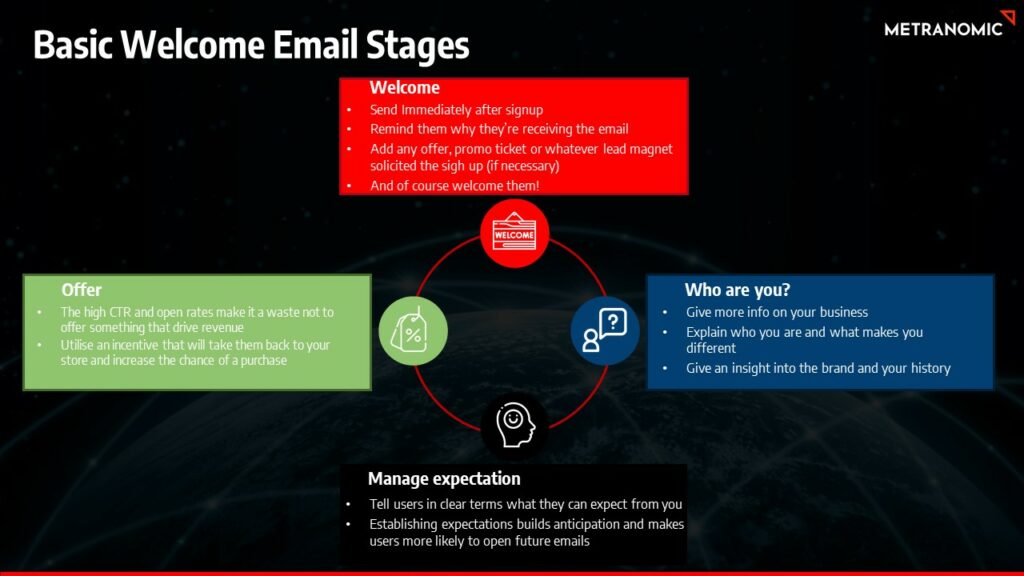
- Key Elements of a Successful Welcome Series: The first step in crafting an effective welcome series is understanding its critical components. These include a warm, engaging welcome message, clear introduction to your brand, and an outline of what subscribers can expect. Remember, this is your first impression – make it count by being informative yet personable.
- Automating for Immediate Engagement: Automation allows you to send these emails immediately after a subscription is made, ensuring your brand stays top of mind. Utilise tools that trigger these emails based on user action, ensuring timely and relevant delivery. This prompt engagement is crucial in building a strong foundation for customer relationships.
- Personalising Welcome Messages: Personalization goes beyond just adding a name. Tailor your messages based on the information you have about the subscriber, such as their interests or how they found your brand. This level of personalization makes the recipient feel valued and increases the likelihood of engagement.
- Examples of Effective Welcome Series: Look at successful brands in your industry for inspiration. Analyse how they structure their welcome emails, the tone they use, and how they align these messages with their overall brand strategy. Learning from the best can provide valuable insights into what works.
Re-Engagement Email Tactics
- Identifying Targets for Re-Engagement: Start by segmenting your email list to identify subscribers who have become inactive. Use criteria like time since last open or click to determine who should receive your re-engagement emails. This targeted approach ensures you’re focusing your efforts on the right segment of your audience.
- Crafting Compelling Re-Engagement Content: Your re-engagement emails should stand out. Use compelling subject lines and engaging content that reminds subscribers of the value your brand offers. Consider special offers or exclusive content as incentives to reignite their interest in your brand.
- Timing and Frequency of Re-Engagement Emails: Timing is crucial. Don’t bombard inactive subscribers with too many emails too quickly. Start with a gentle reminder, followed by a few spaced-out follow-ups. This strategic pacing gives subscribers space while keeping your brand in their minds.
- Analysing the Success of Re-Engagement Efforts: Measure the success of your re-engagement campaigns by tracking reactivation rates, changes in engagement patterns, and any uptick in conversions. This data will help you refine your approach and make more informed decisions for future campaigns.
- Creative Examples of Re-Engagement Campaigns: Draw inspiration from creative re-engagement campaigns that have successfully recaptured audience interest. Look for campaigns that use innovative approaches, like interactive content or personalised recommendations, to rekindle the relationship with their audience.